

Sign up & login
What this page is for
Section titled “What this page is for”This walks you through creating one Pathway Sports Group account and signing in. That same login works on the platform website and AthleteIQ. You do not need a second password for each product.
Before you begin
Section titled “Before you begin”Decide which path fits you:
| Situation | What to do |
|---|---|
| First time with Pathway | Create an account (email or Google) |
| Already have an account | Use Log In |
| Coach who needs coach tools | You still create a Pathway account here — but coach access starts from a coach invite / onboarding link your program provides, not from public AthleteIQ sign-up alone |
Create an account (email)
Section titled “Create an account (email)”- Go to pathwaysg.net.
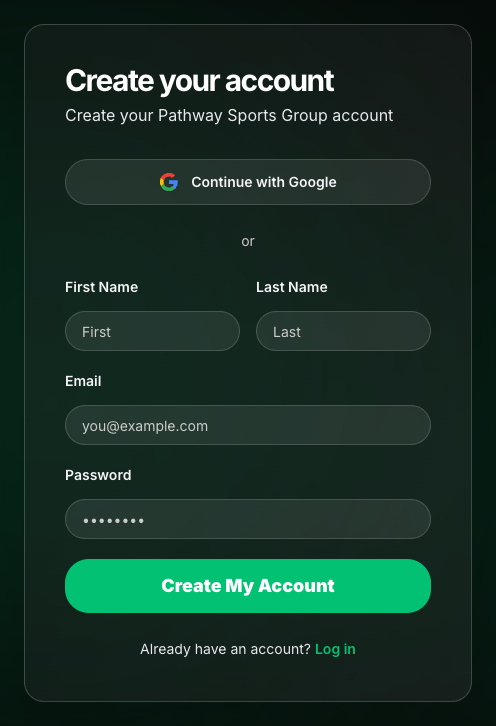
- Choose Get Started or Sign Up.
- Choose Create account with email.
- Enter:
- First name
- Last name
- Password (follow the on-screen minimum length)
- Submit the form.
- Open your email inbox (and spam/junk if needed).
- Click the confirmation link Pathway sends you.
- Return to the site and log in with the same email and password.
Create an account (Google)
Section titled “Create an account (Google)”- Go to pathwaysg.net.
- Choose Get Started or Sign Up.
- Choose Continue with Google.
- Pick the Google account you want to use with Pathway.
- Approve the sign-in prompts from Google.
- You’ll land signed in on the platform (often on Explore), or continue into AthleteIQ onboarding if that’s where you started.
Log in (returning users)
Section titled “Log in (returning users)”- Go to pathwaysg.net.
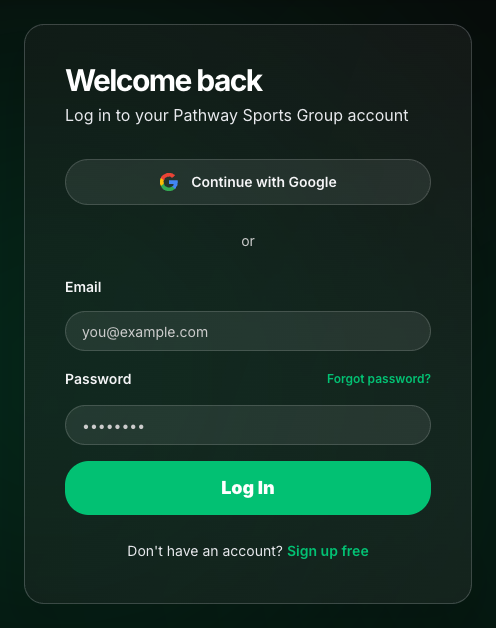
- Choose Log In.
- Sign in with email/password or Google — whichever you used originally.
- After login you usually land on Explore. Open AthleteIQ when you’re ready for check-ins, teams, or coaching tools.
Starting from AthleteIQ instead
Section titled “Starting from AthleteIQ instead”You can begin at athleteiq.pathwaysg.net:
- Choose Get Started or Log In.
- You’ll be sent to the platform website to authenticate.
- After you sign in (or create an account), you return to AthleteIQ to finish role setup.
Same account either way. You’re not creating two profiles.
What success looks like
Section titled “What success looks like”- You’re signed in on pathwaysg.net
- Your name or profile appears in the account area
- Opening AthleteIQ uses the same session / account
- If you’re new, AthleteIQ asks you to choose Athlete or Parent (coaches use a separate invite path)
Forgot password
Section titled “Forgot password”- On the login screen, choose Forgot password.
- Enter the email for your Pathway account.
- Open the reset email and follow the link.
- Set a new password, then log in.
Google accounts reset through Google, not Pathway’s password form.
If something goes wrong
Section titled “If something goes wrong”| Issue | Likely cause | What to try |
|---|---|---|
| “Check your email” / can’t log in after signup | Email not confirmed | Confirm via inbox link, then log in |
| Confirmation email missing | Spam filter or typo | Check spam; try login again to resend if offered; submit Feedback if stuck |
| Google sign-in lands in the wrong place | Mid-flow deep link | Sign out, sign in from pathwaysg.net, then open AthleteIQ |
| Forgot which email you used | Multiple attempts | Try Google first if you used it; otherwise Feedback with the emails you might have used |
| I’m a coach but only see Athlete/Parent | Public onboarding only | Use the coach invite path from your program — see Team coach getting started |
Related reading
Section titled “Related reading”- Choose your path — pick Athlete, Parent, or Coach next
- Roles & access
- Feedback & support