

Feedback & support
What Feedback is for
Section titled “What Feedback is for”During Beta, Feedback on the platform website is how you reach the Pathway team. Use it when:
- Something breaks or looks wrong
- You’re stuck and the docs don’t answer you
- You have a product idea worth sharing
Feedback is not inside AthleteIQ. If you’re in AthleteIQ, open pathwaysg.net with the same account and go to Feedback.
Where to find it
Section titled “Where to find it”- Sign in at pathwaysg.net.
- Open the sidebar (or account navigation).
- Choose Feedback.
- You’ll see Your tickets (past conversations) and a way to create a new one.
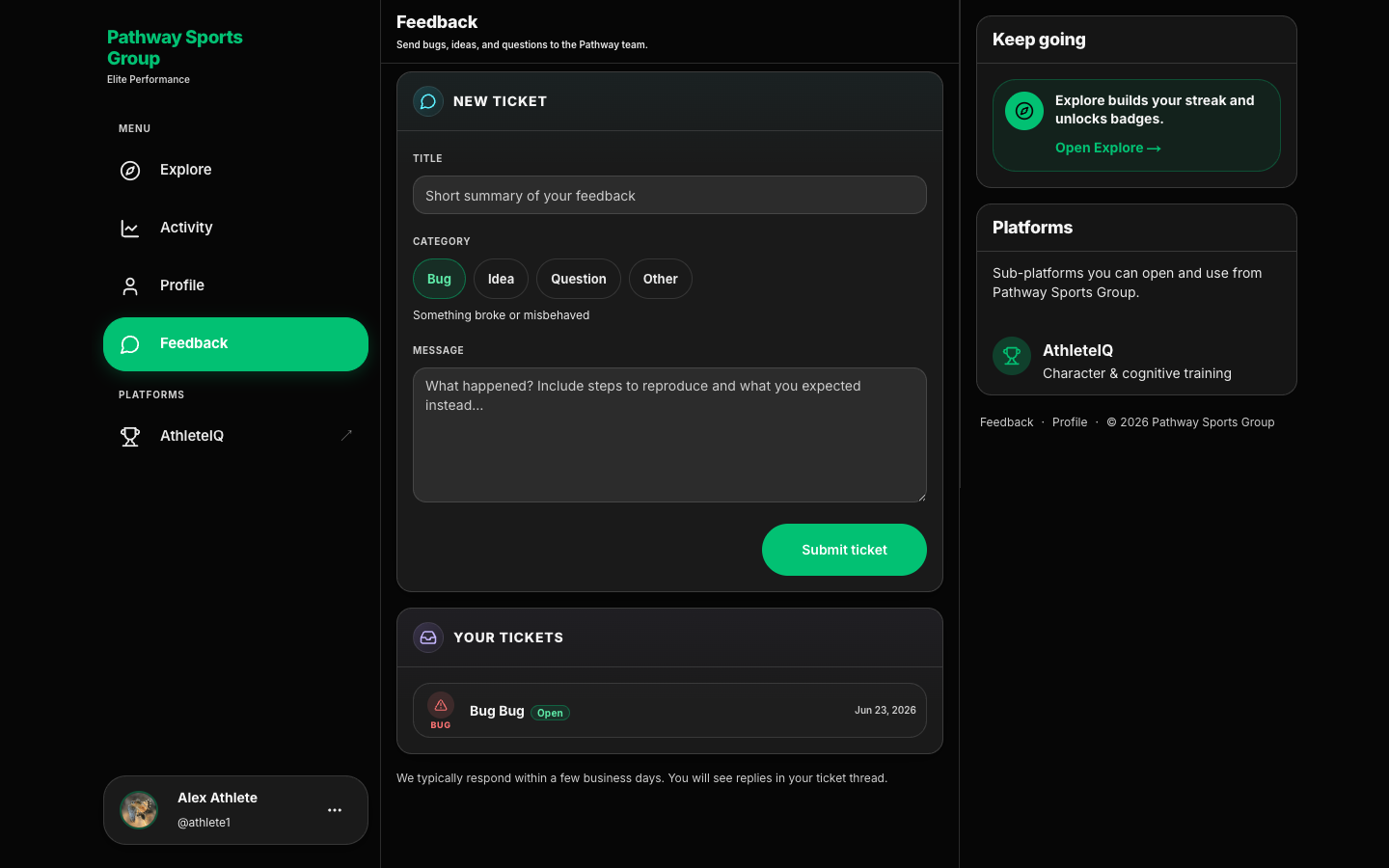
Create a ticket — step by step
Section titled “Create a ticket — step by step”- Open Feedback while signed in.
- Start a new ticket.
- Write a short title someone can scan in a list (example: “Parent link request stuck on pending”).
- Pick a category (table below).
- Write a clear message (use the tips below).
- Submit.
- You’ll land on the ticket thread. Watch for replies there — not only in email.
Categories
Section titled “Categories”| Category | Use it when… | Example title |
|---|---|---|
| Bug | Something broke or behaved unexpectedly | “Check-in submitted but score didn’t update” |
| Idea | Feature suggestion | “Weekly summary email for parents” |
| Question | Help using the product | “How do I resend a parent link request?” |
| Other | Anything else | “Beta rollout feedback from our club” |
What to include (so replies are faster)
Section titled “What to include (so replies are faster)”Put these in the message whenever you can:
- Product — platform website or AthleteIQ
- Your role — athlete, parent, team coach, or college coach
- What you clicked — screens or buttons in order
- What you expected vs what happened
- When it happened — date/time and whether it still happens after refresh
- For bugs: can you reproduce it every time?
Ticket statuses
Section titled “Ticket statuses”| Status | What it means | What you should do |
|---|---|---|
| Open | Received, waiting for review | Wait for a first reply |
| Needs info | Pathway needs more detail | Reply in the thread |
| In progress | Being worked | Watch for updates |
| Resolved | Addressed | Confirm it works for you |
| Closed | Complete | Reply if you need to reopen |
Pathway typically responds within a few business days. Replies appear in the ticket thread.
Feedback vs your program lead
Section titled “Feedback vs your program lead”| Go to Feedback when… | Contact your program lead when… |
|---|---|
| Product bug or confusing UI | Coach invite / onboarding access for staff |
| Account or linking help | Who should join which team |
| Feature ideas | Distributing invite codes across teams |
| Anything about how the app behaves | Following up on coach profile reviews during launch week |
What success looks like
Section titled “What success looks like”- You can find Feedback without hunting
- Your ticket has enough detail that Pathway doesn’t need three follow-ups
- You know to check the thread for answers
If something goes wrong
Section titled “If something goes wrong”| Issue | What to try |
|---|---|
| Can’t find Feedback in AthleteIQ | Open the platform website — Feedback lives there |
| No reply yet | Check status; wait a few business days; reply with more detail if Needs info |
| Submitted under the wrong category | Reply in the thread and clarify |
| Urgent safety concern | Contact a trusted adult / school staff offline as well as Feedback |