

Your AthleteIQ home
What home is for
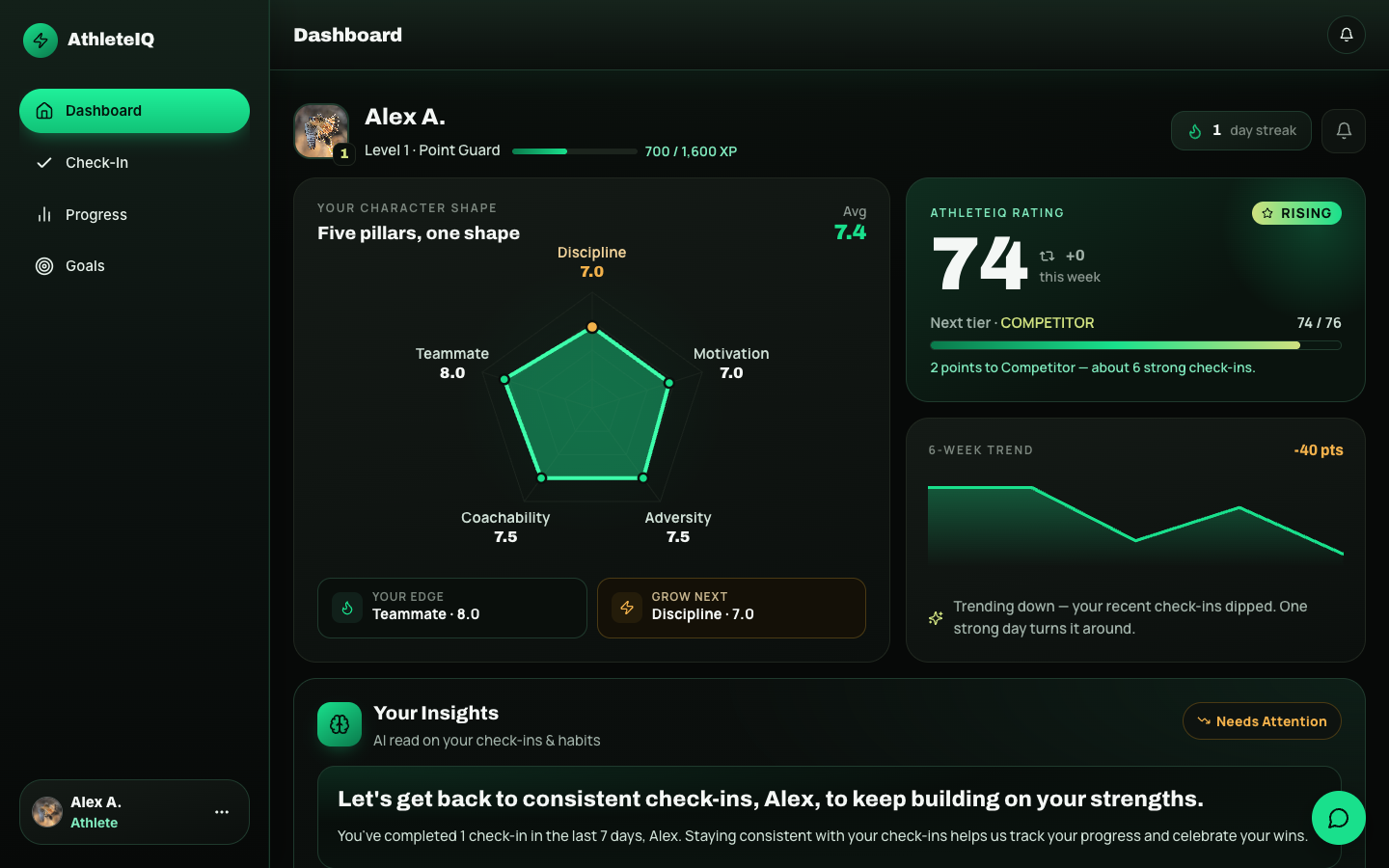
Section titled “What home is for”Once you’re set up as an athlete, AthleteIQ home (dashboard) is your daily starting point. It answers:
- Have I checked in today?
- How am I trending on character?
- What’s one small thing I can do next?
You don’t need to use every card every day. Learn the layout once, then make check-in + one action your habit.
Prerequisites
Section titled “Prerequisites”- Athlete role setup complete (athlete getting started)
- Ideally: you’re on a team (required for check-ins and full progress)
Dashboard map
Section titled “Dashboard map”| Area | What it shows | What to do |
|---|---|---|
| Identity bar | Name, sport, XP level, current streak | Treat streak as a habit counter — protect it with daily check-ins |
| Today’s check-in | Prompt if you haven’t finished today | Tap it first if it’s waiting |
| Character shape | How you look across the five pillars | Notice strongest vs needing care |
| AthleteIQ score | Score plus weekly change | Watch the trend, not one score |
| Trajectory chart | How your score is moving | Open Progress for 7 / 30 / 90 days |
| Insights | Notes from recent check-ins | Read them; they’re nudges, not grades |
| Today’s actions | Active goals + micro-challenges | Pick one you can finish |
| Team focus | Pillar your coach is emphasizing | Lean into it in today’s check-in |
| Parent linking | Share-with-parent controls | Invite when you’re ready |
| Reminders | Daily reminder settings | Set a time you’ll actually keep |
| Recruiting visibility (older athletes) | Opt in/out for college coaches | Only turn on when you’re ready |
Your first five minutes
Section titled “Your first five minutes”- If you see a team prompt, join your team.
- Complete today’s check-in.
- Add one goal you care about.
- Optionally start parent linking.
- Skim insights — then you’re done for the day.
How to read the score and shape (without stress)
Section titled “How to read the score and shape (without stress)”- One low day is normal. Look at the week on Progress.
- A rising streak with a flat score still means you’re building the habit — that counts.
- If one pillar stays low for several days, take a lesson or micro-challenge, or talk with your coach.
- Team focus is a hint from your coach, not a punishment.
Parent linking from home
Section titled “Parent linking from home”When you’re ready:
- Find Share with a parent (or similar) on the dashboard.
- Enter the email your parent will use for Pathway.
- Share / send.
- If they already have an account, they may connect quickly; if not, they’ll sign up as a Parent and you’ll approve if needed.
You control access. Parents don’t see your data until the link is approved.
Reminders
Section titled “Reminders”- Open reminder settings from home.
- Choose a time of day you’ll remember (after practice or before bed).
- Keep notifications allowed on your device if the app uses them.
What success looks like
Section titled “What success looks like”- You know where today’s check-in lives
- You can explain your streak and score in one sentence
- You’ve either joined a team or know you’re waiting on a code
- Optional: a parent link is started or connected
If something goes wrong
Section titled “If something goes wrong”| Issue | What to try |
|---|---|
| Cards look empty / locked | Join a team; complete profile / age group if prompted |
| Check-in already done | Come back tomorrow |
| Parent can’t see you | Confirm email + approval — see For parents |
| Score looks stuck | Finish check-in, refresh; Feedback if it persists |